Get Email Updates:

Showing posts with label OPC Drum. Show all posts

August 10, 2010

Printer Buying Guide: Consider Print Volume!

August 10, 2010 0

Printer buyers nowadays don’t just look at the printer’s price tag as the single mitigating expense. Focus is also directed on the cost of laser printer supplies that support printer operation. Nonetheless, Small and medium businesses (SMB) also need to consider the expense component of a small scale office printing solution when used over long periods of time; instead of just finding comfort in the acquisition of a printer and laser printer supplies arrangement that conforms to the budget and printing requirements of the workplace. It is therefore necessary  to invest in an office printing solution that can easily cope-up with the expanding printing requirements of a growing business. One aspect in a business solution that could push printing expenditure up is printer maintenance.

July 19, 2010

How to confirm if your toner cartridge is defective?

July 19, 2010 0
 Photo by duchesssa
Ever since desktop printers came into our midst, every little sort of printing trouble seems to have confounded users to no end. A few decades ago, printing was exclusive to local print shops and this prevented end users from experiencing nagging print troubles. But with printing now crossed over to homes and offices, it seems that users never fail to encounter print irregularities in the operation of modern day laser printers. The usual suspect for print defects is of course the toner cartridge, particularly if its a third party unit.

June 29, 2010

Smart Toner Cartridges: The Product of Smart Engineering

June 29, 2010 0

When the factory installed OEM starter toner cartridges that come with a new laser printer dries out, users will always want a perfect replacement. But how do we define a perfect toner cartridge replacement? Well, the best gauge is likely print quality, which could be rated to either match or exceed the print performance of the OEM cartridge. Second on the list is print yield coverage where cartridge is expected to deliver the same volume of prints as the OEM cartridge is rated; based on the industry mandated page coverage of 5%. Furthermore, the replacement cartridge should not succumb to toner leaks or else it would put in too much strain on printer components. Nonetheless, the most important consideration is the pricing of the cartridge which ought to be affordable to a wide range of laser printer users with differing budgets and buying preferences. All of these cartridge features can only come from products of fine technology because smart engineering will naturally produce smart, if not perfect toner cartridges.

June 16, 2010

Dissecting the Laser Printer’s OPC Drum

June 16, 2010 0
The OPC or Organic Photo Conductor Drum is the heart and soul of a laser printer. This is one component that makes laser printing really possible. The process of electro-photographic (EP) printing requires the OPC Drum to play host to the negatively charged raster graphic image routed by the laser scanning assembly. How the OPC Drum accepts and retains the electro-static charge can be determined by inspecting the materials and substances applied to the Drum's surface.

June 8, 2010

Unraveling the Printers Unique Laser Scanning Unit

June 8, 2010 0
Photo by comx

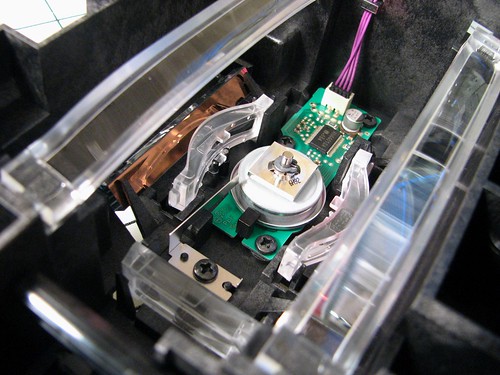
Laser Printers use light beams to scan the latent image formed on the rotating OPC Drum or the photo conductor drum. Scanning is possible because the document stream coming from the computer or the server is first transformed into a raster graphic image composed of dots. Each dot is relayed to the OPC Drum through the laser beam delivered by the scanning unit. The process of scanning actually replicates the action of electron beams employed with Cathode Ray Tube (CRT) television sets of the past; where electron beams pass through a series of filters to form the images on the TV screen that is discernable to the naked eye.

June 7, 2010

Dots Per Inch (DPI) Resolution: The True Measure of Print Quality

June 7, 2010 0
Photo by shlomaster

DPI resolution. Imagine a laser print on paper that is one square inch in size. Under a resolution size of 1200 DPI x 1200 DPI , the printer’s scanner can accurately pack 1200 dots on a single horizontal row that is 1 inch wide. Depending on how fast paper or media moves, 1200 dots in a single column file (also1 inch in length) can be generated vertically as well. The finished print is sharp, smooth and no longer grainy because of the 1,440,000 (1,200 multiplied by 1,200) dots that comprise the 1 square inch image. Images set with high Dot Per Inch (DPI) resolution differ from a 300 x 300 DPI or a 600 x 600 DPI (lower resolution sizes) image because dots generated are far in between that reduces print intensity, resulting to images that are dull and absurdly grainy. The process of converting images into a raster graphics image composed of dots forms part of the electro-photographic (EP) printing process.

June 1, 2010

Does your Printer rate well with the BUZZ METER?

June 1, 2010 0
Photo by exian
When it comes to color laser printing, the buzz meter always provides users timely information and feedback on Total Cost of Ownership (TCO), the latest development in print speed based on output pages per minute (PPM), cost per page (CPP), and updates on state of the art printing technology such as the single pass array. The list goes on and on.

March 17, 2010

Quality Toner Plus Good Fuser Equals Excellent Laser Prints

March 17, 2010 0
Laser printers are designed with several components working in sync to deliver the laser printouts that appeal to most consumers. Each printer component contributes to the entire printing process. The laser scanning assembly transforms information originating from the PC into dots. The OPC drum forms the image while the mechanical components move the paper. But what dictates printout quality is the make of toner particles supplied with the cartridge and the fuser assembly that bonds toner to paper.
What is quality toner? This refers to toner manufactured on the merits of sound substance formulation; properly controlled particle shape and size, and low melting points. Quality toner also passed stringent laboratory tests to guarantee the expected yield and print performance. Toner powder formulation for the OEM HP CC364A toner cartridge and the HP P4015 toner refill kit falls under the category of “quality toner.” And since compatible toner powder is manufactured based on the same set of standards as the OEM toner i.e. weight properties, particle shape, melting point and water based emulsion technology – then expect both toners to deliver similar print quality and yield of 24000 pages at 5% coverage.

March 1, 2010

How toner cartridge components operate to produce a laser print on paper?

March 1, 2010 0
The process by which laser printers affix the printed image on media (paper) can be a bit fuzzy; though it’s clear that the machine relies on static electricity to run the entire printing cycle. Unlike inkjet printers that literally spray ink through micron size nozzles, laser printers use the negatively charged OPC drum to attract the positively charged toner particles into the image set over the drum surface by the laser scanning assembly. Simply put, charged toner particles freely jump into the rotating photoreceptor drum.

The host computer and printer work in tandem to generate and process the image on the printed document. Data is supplied by the host computer and received by the printer control board which deals with all the incoming signals and places the deciphered information on the page as directed. Since the information has been converted into a serial bit stream it is forwarded to the laser scanning assembly that emits it as multiple dots on the photoreceptor drum.

The photosensitive drum revolves as the laser scanning assembly transfers the stream of information across the surface of the drum. The process is referred to as registration. But before the action of the laser assembly commences, the drum is first exposed to a set of erase lamps that will clear the component from residual traces of the previous image. As the drum is now left with a neutral electrical charge and as high voltage is applied to the corona wire it creates a charged negative field. This conditions the drum to accept a uniform negative charge (-1000V) applied across it. As the images is being made by the laser scanning assembly, the toner cartridge works to apply toner on the negatively charged dots.

The toner cartridge is outfitted with a developer roller that turns simultaneously with the photosensitive drum, and expels a measured amount of toner through a restricting blade. A regulated AC voltage is applied to assist toner particles as it leaves the cartridge and literally jumps into the negatively charged dots on the drum’s surface. But toner cartridges like the Brother TN-350 are programmed to gather toner excesses from the drum and recycle it back to the cartridge. Prior to reuse, the recycled toner is first subjected to an additional positive charge before it enters the toner chamber. Once the image formed on the drum has been transferred to paper, the whole ensemble (paper and toner) moves to the fuser assembly that binds toner to paper permanently.

Toner refill kits when used in the laser printing process must be of similar formulation to the OEM toner; not only in terms of substances and grain size but also in the aspect of melting point to meet the equipment specification. Thus laser printer manufacturers insist that toner must be of high quality and similar to the original toner to avoid inconsistencies in the printouts.

February 26, 2010

Why are Dell toner cartridges expensive?

February 26, 2010 0
Why are new generation color toner cartridges very expensive? This observation covers all color toner cartridges and not only those that loads the DELL 5100cn color laser printer. Well, technically the main reason would point out to the design of the print engine. The color laser printer uses four CYMK (cyan, yellow, magenta, black) cartridges to print color images and graphics. In the previous print engine design, all 4 toner cartridges were placed in carriages that turn around a central OPC Drum. All cartridges synchronically supply required amounts of toner over the latent image created on the OPC Drum by a single laser scanning assembly. Therefore, cartridges back then were designed for the sole function of storing toner and that is why cartridges were built smaller, much more simpler and cheaper.

Recent print engine design for color laser units is different in a sense that all toner cartridges are fixed and stationary, and arrayed either vertically or horizontally. Moreover, the cartridge alignment makes it impossible for cartridges to supply toner to a single OPC Drum. Designers added 4 OPC Drums and 4 Laser Scanning Assemblies - one for each cartridge. And what better way to make the process work but to attach the toner cartridge assembly to the OPC Drum component. This results to better printouts delivered at a much faster turnout. In line with the new print engine design, the OPC drum is now housed together with the toner cartridge. So when the cartridge runs out of toner, the user technically replaces not only the cartridge but also the OPC Drum.

Solo cartridges produced in the past were already very expensive. Well, the new toner and OPC Drum cartridge combo is even more pricey. But one simple fact remains. The lifecycle of the OPC Drum is at least 3 times or more than that of the toner cartridge. The Dell 310-54808 toner cartridge (yellow) is rated 8,000 pages at 5% coverage and the OPC Drum has a life expectancy of over 30,000 pages; also at 5% coverage. Every time a user discards an empty cartridge combo, the OPC Drum is also disposed even when the component has not even reached 20% of its full potential. And considering that the toner cartridge alone can last over 3 lifecycles, imagine how much money is wasted because the Dell OEM toner cartridge combo costs $210.

However, users can prevent the ‘printing blues’ by administering toner refills on the empty toner cartridge combo. Bear in mind that a compatible DELL 5100 toner refill kit sells for only $28.95 and since it is manufactured along similar lines with the OEM toner, it is guaranteed to perform at par with the genuine cartridge. Moreover, the user can institute refills on an empty cartridge several times over the industry recommended refill frequency. This way, substantial savings could really be generated.

So, why do OEM color toner cartridges cost so much? To reiterate, the consumable has evolved to a toner cartridge and OPC Drum duo.

February 17, 2010

Toner Refill Kits: Reduce Color Printing Expenditure on the Xerox Phaser 2135

February 17, 2010 0
The Xerox Phaser 2135 is a color laser printer renowned for producing high resolution, full color pages at the remarkable speed of 21 pages per minute (ppm). The unit runs on ‘straight paper path’ technology which considerably reduces the incidence of paper jams while sustaining favorable print delivery turnout. As such, the printer uses 4 sets of toner cartridges – OPC Drum combo and 4 sets of laser scanning assembly but utilizes only a single fuser responsible for bonding toner permanently to paper fibers. To simplify image development, toner coming from the OPC Drum is laid by way of electrostatic potential on the ITB (image transfer belt), before coming in contact with paper (media) and prior to entering the fuser assembly.

The Phaser 2135 prints on bundled replacement toner consumables that aggregately cost $1,100. These are supplied in four CYMK (cyan, yellow, magenta and black) cartridges with each color yielding some 15,000 pages at 5% coverage. The black cartridge retails at $100 while the color cartridges are sold at a counter price of $345 each. The cartridges are high yield, so the printing cost per page (CPP) is obviously very low. Despite the low CPP, it is for a fact that the pricing of its consumables can be very restrictive to the budgets of regular laser printer users.

What makes the Xerox Phaser toner cartridge expensive to produce? The new generation toner cartridge comprises of the toner cartridge and OPC Drum duo. While the toner cartridge is rated at say 15,000 pages, the OPC Drum has a lifecycle that exceeds that of the cartridge at around 60,000 pages. Therefore, the still functional OPC drum gets disposed whenever the toner empty cartridge is discarded. In manufacturing the cartridge and components alone, the cost could reach $150 add the cost of the OPC Drum at over $250 and you’ve got a staggering total cost.

How can we reduce color-printing costs on the Xerox Phaser 2135 laser printer? The practical option would be to refill its high capacity and standard cartridges with a compatible toner refill kit. Using Laser Tek Services’ Phaser 2135 compatible toner refill kit, the user can save as much as 80% from the bundled pricing of OEM monochrome and color cartridges without sacrificing print quality and yield. Toner refills can be administered on the empty cartridge based on the Industry recommended frequency of up to 3 times or until such time that the OPC Drum has reached the end of its effective lifecycle.


Check out our Xerox Phaser 2135 toner refill kit. Place an order today and put those empty Phaser cartridges back to life.

February 12, 2010

Toner Cartridge ‘Build Quality’ Determines Toner Refill Frequency

February 12, 2010 0
Given the unwavering popularity of toner refill kits, consumers are now turning to the Build Quality of toner cartridges. The reason is of course obvious. Users want their toner cartridges to last more than the recommended 3 refills, which presents potential savings in the long run. There is no longer a monopoly by OEM cartridges because third party manufacturers are also producing compatible toner cartridges that are able to meet the quality standards set forth for OEM consumables; but priced by at least 20% less.

The War of the Toner Cartridges, so to speak, is on and the brand that satisfies build quality the most will likely get a hefty share of the printer consumables market. This so called cartridge war will benefit the end user as both OEM and third party manufacturers will be determined to produce a toner formula that would capture the blackest black and the sharpest color prints.

What to expect in a ‘build quality’ toner cartridge? Similar to OEM cartridges, the unit components of this type of cartridge include the Organic Photoelectric Drum (OPC), the Primary Charge Roller (PCR), magnetic rollers, wiper and doctor blades. But unlike the regular toner cartridge, the components of a build quality unit have been designed to last much, much longer than 1 or 3 print cycles. To further guarantee print quality; said cartridges are outfitted with durable seals and end foams to prevent toner leaks; to deliver optimum printouts up to the expected life cycle of the toner cartridge. Users should always check the label on the OEM cartridge’s packaging for this statement: The cartridge may contain recycled components. Cartridges built from recycled materials will definitely turn out with lower life cycles compared to those produced from virgin components.

With build quality already secured, the user can now turn to the equivalent toner refill kit – the other half of the printing partnership. OEM and refill toner undergo rigorous laboratory print tests to come up with the desired color quality. This test will produce printed pages of solid blacks and a series of halftones which would assure that text printed are sharp and clear. Color tests performed on cyan, magenta, yellow and black toner include complete solid prints on several gradations to reach as much as 250,000 color hues that is required for the printing of photos, graphs and other graphics. Since compatible toner also undergoes similar laboratory tests, this would further boost the stature of refill toner – to really stand ‘toe to toe’ with the OEM toner in the intent of giving users the best color printouts but at more affordable prices.

brother tn-670 toner refill kit A perfect example of compatible toner that meets or even exceeds industry standard is the toner supplied with the Brother TN-670 toner refill kit. Said consumable can be used to refill the cartridges of the Brother HL-6050, HL-6050D, HL-6050N laser printers. The kit retails at $13.95 and is likewise rated 7500 pages at 5% page coverage, just like its OEM counterpart. Compare this to the OEM toner cartridge that is sold at $85 and you definitely have a budget consumable at your disposal.

Always look for Build Quality toner cartridges to enjoy more than the standard refills and considerably save on toner consumable expenses.

February 8, 2010

HP 2600n: Faded Prints and Laser Scanner Contamination

February 8, 2010 0
It is typical to attribute the faded or worn out printouts produced by color laser printers to a low or depleted toner supply. Now this can be easily resolved by replacing the toner cartridge or by replenishing the toner supply of the exhausted cartridge with compatible toner supplied by an HP toner refill kit. If upon ocular inspection, the cartridge still has sufficient toner and the magenta cartridge is likely causing the fading prints, then this could be a case of "laser scanner contamination."

This condition can easily be detected in the HP 2600n color laser printer because of its design alignment where toner cartridges are stacked one above the other. However, this is not a design flaw of the print engine. The magenta cartridge is positioned on the bottom part of the array and therefore has the tendency to absorb loose toner and dust the most; to contaminate the laser scanning assembly eventually.
printer and laptop


The print engine of the HP 2600n color laser printer comes designed not only with 4 toner cartridges but also with 4 OPC drums, 4 laser scanning assemblies; one each for the Cyan, Magenta, Yellow and Black toner cartridges. It is only unfortunate that the design calls for the magenta cartridge at the tail end of the cartridge array.

Over time, loose toner powder and dust collects on magenta cartridge components coating the sensitive laser and rotating reflective mirrors or lenses which consequently reduces its capability to accurately emit required light pulses on the OPC drum to form the latent image.

Failure of the laser scanning assembly results in faded or worn out color prints. Maintenance of the laser scanning assembly does not form part of the HP 2600n printer's internal cleaning features. Therefore, only manual troubleshooting will do the trick. The task of cleaning the laser scanning reflective mirror and lens is a simple matter, particularly with the printer service manual around. However, the location of this component inside the printer could not be easily reached and in fact entails dismantling the printer. For the beginner, that would take a couple of hours to complete the job.

The task is therefore best left to printer technicians to do justice on the cleaning of the laser scanning assembly.


-----------------------------------------------------------------------------------------------

Are you using the
HP LaserJet P2035 series laser printer?

The unit's toner cartridge can be recycled
for another cycle of printing using a compatible toner refill kit.


Available from Laser Tek Services for only $26.95.

-----------------------------------------------------------------------------------------------
Kit refills the following HP cartridges: CE505A CE505X. Save up to 80% from the retail price of the OEM cartridges when you buy the 4 pack.

Using an HP toner cartridge from another printer series? Check out our HP compatible toner refill kits.

February 3, 2010

Dissecting the Cost and Material Components of the HP CP1215 Toner Cartridge

February 3, 2010 0
Toner cartridges, particularly for color laser printers such as the HP CP1215, are expensive. Thus, many users nowadays resort to toner refilling once these cartridges run out of toner supply. Refilling is the most sensible option, considering the cost ratio of toner to the entire cartridge unit which happens to be only 10% or even less than that. Toner supplied with a compatible HP CP1215 toner refill kit is retailed at $33.95 (package includes the reset chip) compared to the OEM cartridge which comes with a price tag of $80. So in a nutshell, the bulk of the amount paid by the user for a new OEM cartridge goes to the material and production cost of the polymer casing that is about $70 in the case of the HP CP1215 OEM cartridge. The user actually saves a lot of money if a cartridge can be refilled several more times over the recommended 3 to 4 refills.

What imaging components are found inside the HP CP1215 toner cartridge? The color cartridge comprises of the toner hopper and waste chamber duo, secured into place by end caps. Releasing the 2 vital components exposes the OPC drum, together with the wiper blade responsible for cleaning the drum's surface of residual toner after each print cycle. The recovery blade completes the work of the wiper blade by channeling excess toner into the waste toner chamber. The second component is the Primary Charge Roller (PCR) that supplies the OPC Drum with a uniform negative DC voltage - a PCR function controlled by the laser printer's intensity setting. Together with the doctor blade, PCR dictates the amount of charged toner that will adhere to the developer roller; aided in the process by the foam feed roller.

Any of the 3 rollers (OPC Drum, PCR and Developer Roller) would become the main cause of print defects if left to perform its routine functions indefinitely. Therefore, when pronounced print defects emanated from these vital components, the faulty component must be immediately replaced to sustain expected print quality. Nevertheless, attempt to analyze the cause of the print defect since print irregularities may also be triggered by a defective OPC Drum wiper blade or a dirty foam feed roller that are designed only as accessory to the main rollers, but can obviously cause backgrounding even then.

The OPC Drum has a rated capacity of over 30,000 printed pages at 5% coverage, so never suspect the integrity of the OPC, particularly when the capacity is not yet breached. Besides, an OPC drum has a microchip page counter that turns off the printer automatically once the rated capacity has been reached. In most instances, the PCR and developer roller are the first components to yield to the wear and tear of everyday laser printing, and following subsequent refills using HP toner refill kits. Therefore, the mentioned components need to be replaced as soon as possible to keep the toner cartridge in tip top condition.

So, when print defects persist and the OPC Drum is still in fine form, the user is left with no option but to replace the PCR and Developer Roller.

February 1, 2010

Repetitive Defect Chart: Dependable Guide to Troubleshooting Print Quality Defects

February 1, 2010 0
Print quality defects hardly manifest in the operation of brand new HP LaserJet CP1215 laser printer units. Over time, print defects could no longer be avoided as the printer ages. The reason for this is obvious. As printer components start to wear out on the aging printer, this directly manifests over the output pages. The print engine of the laser printer works mechanically to deliver paper from one component to the next; aided in the process by sensitive sensors which inform the user in the event that one vital part malfunctions and shut-off the printer unit altogether. This is an automatic response system because operating with a damaged component would affect the condition of all the other components and consequently increase printer repair and maintenance costs in the process.

However, the user can easily monitor the condition of pertinent printer components through the print defect that manifest over the printout and institute troubleshooting by simply studying the physical properties (i.e. the defect's ruler measurement) of the defect and identifying the suspect component through the printer's Repetitive Defect Chart thereafter. Any print defect is typically triggered by a damaged printer component; but identifying the source component for the defect without the aid of the Repetitive Defect Chart can be difficult and time consuming. For example, if the Image Transfer Belt (ITB) is damaged, the ensuing print defect manifests at intervals of more than a full page. Thus, replacing the ITB at this point makes more sense in the intent of restoring acceptable print quality. The same also holds true for defects that cover a distance of 75.8 mm over the face of the paper as this print anomaly points out to a defective Organic Photo Conductive (OPC) Drum. In this case, the component has to be cleaned and thoroughly assessed or replaced.

Below is a rundown of different laser printer components and the corresponding print defect that legibly shows on the printout which directly affects the integrity of prints.

· Defective ITB the distance is 633.6 mm and is longer than one full page.

· OPC Drum – 75.8mm

· Transfer Rollers – 57.0 mm

· Fuser Pressure Roller – 56.8 mm

· Fuser Sleeve – 56.5 mm

· Registration Roller – 44.0 mm

· RS Roller (feed roller) – 28.5 mm

· PCR (Primary Charge Roller) – 26.7 mm

· Developer Roller Sleeve – 22.3 mm

The Repetitive Defect Chart clearly identifies problem components that consequently eases out the troubleshooting process to free the laser printer from nagging print defects. It is for a fact that for brand new laser printer units, the only defect that could materialize is one coming from a low toner supply. This can be easily resolved through the purchase of a brand new toner cartridge to replace the exhausted unit. A more cost-effective option is the refill of used toner cartridges with compatible toner supplied with the HP CP1215 toner refill kit which generates big savings in the process.

The monochrome toner cartridge costs $80, while the corresponding refill package retails for only $33.95. Both toner products deliver similar print quality and yields 2200 at 5% page coverage. Package also comes with a cartridge reset chip.

December 9, 2009

HP Toolbox - Activate to clean the HP 2600n Color Laser Printer

December 9, 2009 0

Print troubles and print quality irregularities are seldom encountered in the first few months run of a laser printer unit. Over time, toner and paper dust will accumulate over printer components such as the OPC drum, fuser assembly and even the mechanical rollers that come in contact with paper. This consequently affects component performance and produce print quality defects (like toner smears) over printouts. The only option therefore is to clean or perform maintenance work over affected components; which is tedious since that would involve dismantling pertinent printer panels to reach the inner cavities of the laser printer.

Maintenance work must be concentrated on the fuser assembly since the component does not have an automatic toner cleaning system. As the fuser generates a lot of heat, some of the toner particles tend to adhere to the fuser rollers and stick permanently, even if the cylindrical surface is coated with Teflon (a non-stick material usually coating frying pans). Consequently, a sizeable mass of toner particles sticking to the rollers can produce toner smears over printouts. Fuser rollers therefore need to be cleaned periodically to sustain acceptable print quality; unlike OPC drums that come outfitted with a cleaning device called the doctor blade. The doctor blade is made of thin and soft polymers that collect excess toner from the drum's surface and deposits it to the waste toner chamber of the toner cartridge.

Users of the HP 2600n color laser printer are fortunate because the printer unit comes with a built-in cleaning system that can be activated right on the printer's control panel. The cleaning procedure is outlined as follows:

  1. Turn on the laser printer and be sure that it is set to ready mode.
  2. Open the HP Toolbox from the printer's control panel
  3. When the troubleshooting tab appears, click maintenance and follow it up by pushing the cleaning page icon. The printer will then print a document with printed pattern.
  4. Remove all loaded print media in tray 2 and from the optional tray 3.
  5. Take out the printed media with pattern and position it face down into the paper tray 2 or the optional paper tray 3.
  6. Lastly, press clean on the printer panel

The whole sequence should clear the fuser assembly of baked toner and paper dust, and produce smear free printouts.

Print defects are the fare of laser printers and they are numerous. But when print irregularities are due to a low toner supply or an empty OEM toner cartridge, replenish the cartridge's supply with a compatible toner refill kit and extend its print capacity for up to 3 print cycles.

Look up our previous posts on the HP 2600n laser printer.

November 27, 2009

Printing Cost Per Page (CPP): Dissecting a Print Job's CPP

November 27, 2009 0
What constitutes CPP?
Reckoning the cost per page (CPP) of laser print jobs is not an easy task as there are a number of variables involved in the computation. It would have been easier if CPP is measured only based on consumable costs (e.g., toner cartridge, toner refill kit) against the number of pages printed. But then this is not the case since the cost of paper is also factored in along with the energy consumed to process the print job. Perhaps, what is most daunting is determining the depreciation cost of the printer unit as printer components like the OPC Drum and fuser do not expire at the same time. Each time you print, these components also share some degree of wear and its life cycle is dependent upon the number of pages printed. If the rated capacity of the OPC drum is 6,000 pages (an assumption) then CPP for the OPC drum is cost of component divided by the number of pages printed. Therefore, one will have to rely on calculated assumptions to get a fair cost analysis of these consumables.

Is the standard Page Coverage of 5% realistic?
Take the case of the HP CB540A black toner cartridge that loads the HP LaserJet CP1215 color laser printer. With the consumable's rated capacity of 2,200 pages at 5% coverage, the standard page coverage of 5% is too conservative against the actual coverage. Most likely, coverage borders between 30% to 35% which brings actual yield in printed pages to only around 1,400. So, if the print job is over 2000 copies, then in-house printing will be more expensive considering the need for another replacement cartridge to produce the remaining copies. In this case, it becomes more economical to outsource the print job. On the other hand, if the print job only involves 20 to 30 pages, then in-house printing using the CP1215 laser printer is really the most sensible option.

HP Laser Printer CPP versus offset printer charge per copy?
To help laser printer users appreciate the value of CPP, printing giant Hewlett Packard prepared a printing cost footprint - a cost computation that covers all the variables relevant to the print out of a single color document.by the CP1215 color laser printer. HP’s computation of cost per page (CPP) include toner requirements, cost of paper, energy required to sustain printer operation as well as the depreciation of printer components. HP’s cost computation for a color print job that covers 50 copies at 30% page coverage comes at $0.295 per page; with the print job's aggregate cost estimated at around $14.72. The acquisition cost of the color printer is valued at around $300 - so it will take 17 print jobs of the same volume to offset the cost of the printer. The CPP is definitely much cheaper in this case compared to the local printer's $0.66 charge per copy for the same print requirement.

For users intending to reduce on printing expenses, CPP is even lower with a compatible toner refill kit - cheaper by 50% than OEM toner cartridges. Toner refill kits are produced by third party manufacturers and are intended to refill empty OEM toner cartridges. The CB540A cartridge is retailed at $75 while an equivalent toner refill kit sells for only $39.95. Nonetheless, the consumable delivers similar print quality and yield as the OEM toner cartridge. Read more about toner refill kits from this post.

November 25, 2009

Troubleshooting Print Defects: When the Drum Unit is Suspect!

November 25, 2009 0
Troubleshooting print quality troubles for the HP LaserJet 2550 color laser printer based on a defective printout is a tough nut to crack. A laser printer is outfitted with several components; from mechanical rollers, to the photoreceptor drum, the toner cartridge and the fuser assembly. Each of these components is capable of inflicting toner smears on the printout. The only sure way to correct faulty prints is to pull out the suspect component responsible for pertinent print irregularities and physically check it for defects. However the process is tedious, because it involves ocular check-ups of selected, if not all components that come in contact with the paper (medium).

Measuring the Print Defect
Hewlett Packard however made troubleshooting for the HP 2550 so much easier with the use of a repetitive defect ruler. By measuring the actual dimension of the defect on paper (using a ruler), the ugly head of the suspect component can be identified. Since we are dealing with a defective OPC Drum, the repetitive defect measures 148.3 mm in length. Said measure actually indicates that such defect is produced by a defective photoreceptor drum. From thereon, the user simply needs to pull out the photoreceptor drum and physically assess its condition. If the defect is more pronounced, it has to be replaced and if defect is not visible, the drum probably just requires cleaning.

Replacing the Drum's Lockout Chip
Photoreceptor drums are designed with electronic based microchips or lockout chip that count the actual printed pages and consequently desist printing once the rating limit is breached. Standard capacity of the photoreceptor drum is from 6,000 to 8,000 copies at 5% coverage (the industry standard measure of page coverage) and the microchip nominally bars printing after the stated limit. However in cases where not a single defect manifests at the time printing stopped; it could only mean that the OPC Drum is still in fine form and the user will only have to change the lockout chip to commence printing.

Replacing the Drum Unit
On the other hand, if printouts have defects attributed to a defective OPC drum unit, a physical inspection of drum surfaces will not always be a sufficient indicator of the component's actual condition. A tear on its selenium coating is a visible defect (easily recognizable) but if the drum has lost its photosensitive properties, then no amount of physical inspection will be enough to determine what is really wrong with the component. In cases where the OPC drum is suspect and the defect persists, the only choice is to replace the OPC Drum.

Remember that while print defects are a regular fare for laser printers, most print quality troubles emanate from a toner low or toner empty, toner cartridge and seldom do these stem from faulty printer components. Defects attributed to toner empty cartridges can be resolved with the use of a compatible toner refill kit; where the supplied compatible toner powder is used to replenish the cartridge's toner supply. The bundled cost of OEM HP 2550 toner cartridges is around $350 with each cartridge having a capacity of 1,500 pages at 5% coverage. Read more about toner refill kits from our previous post.

For those operating on a shoestring budget, the compatible HP toner refill kit rainbow pack is retailed for less than $100 but delivers similar print performance and yield as the OEM toner.

Read a related post on How to determine if the laser printer drum needs to be replaced?
Related Posts with Thumbnails
 
◄Design by Pocket►
