
Get Email Updates:

Showing posts with label Brother toner refill kits. Show all posts

November 4, 2009

A Look at the Brother ‘At Your Side’ Recycling Program

November 4, 2009 0
Brother International Corporation (BIC) has organized a responsible recycling program through its ‘AT YOUR SIDE’- corporate aphorism. The program aims to encourage Brother equipment and peripheral consumers to recycle used components such as empty toner cartridges by returning it back to BIC for proper recycling and disposal. Some of the returned printer peripherals are remanufactured while other metal and plastic components are broken down, reprocessed and used as raw materials for the manufacture of other printer parts.

To seal this noble intention geared at preserving the environment, BIC designed its recycling facilities to conform to ISO 14001 (International Organizations for Standardization) guidelines and consequently addressed pertinent environmental management concerns. The ISO is a series of standards that are relevant to environmental management systems. In fact, Brother selected five R’s as keywords intended to encapsulate the company’s environmental activity – REFUSE, REDUCE, REUSE, REFORM, and RECYCLE. This environmental program rightfully serves Brother’s stature as an environmentally responsible corporate citizen.

The Brother ‘AT YOUR SIDE’ recycling program accepts used laser printer toner cartridges and users are encouraged to deliver properly packed, empty printer cartridges to the different pick-up points designated around the country. Another option is to forward used consumables by mail (free of charge) using shipping labels that can be printed from Brother's recycling page on its website. Note however that unlike HP and Staples, Brother does not provide incentives, cash rewards or tax rebates for every toner cartridge returned.

Recycling at the personal level is easy with Brother consumables since all Brother OEM toner cartridges are provided with toner fill holes. Once the toner cartridge runs dry, a user will only have to open the fill hole by flipping the hopper plug off the toner chamber and pouring in fresh toner powder supplied by a toner refill kit. Now the refill process can be performed 3 to 4 times until the cartridge has reached its maximum effective print cycle. By then, the consumable can be forwarded to the Brother recycling plants for appropriate disposal.

Brother laser printer users have the distinct advantage over other printer users since the BIC takes proper care of its consumers by providing them not only user-friendly products but environmentally fine-tuned equipment as well.

September 29, 2009

HP 2600n Laser Printer: Resolving Print Quality Issues

September 29, 2009 0
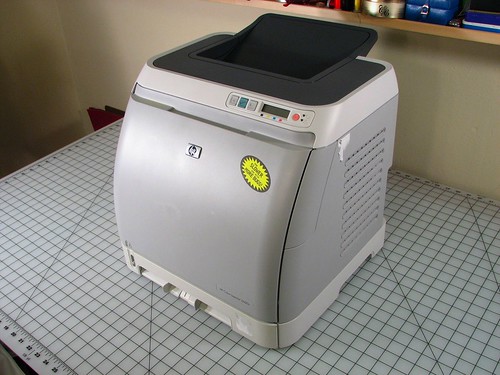
Like most color laser printers, the HP 2600n is no exception as it has had its share of print quality issues. However, unlike other laser printer manufacturers, HP supplied solutions to nagging quality concerns to help its customer base. Most of these issues have ready solutions built into the laser printer unit. The user will simply have to access the printer's control panel where a few touches of a button will automatically resolve printing troubles.

Print quality issues are numerous, but lets try to take a few defects one at a time and present the solutions or steps necessary to correct those. These defects may be commonplace with printouts but can be a bit annoying when these manifest regularly. Remember that all laser printers have print defect issues, and solutions or recommendations to address such will vary from one printer to the next.

Print is light or faded. Faded prints likely result from the use of media (paper) that do not meet HP 2600n specifications. This can easily be resolved by replacing media used with paper specified by the printer. The same defect can also be caused by low toner supply involving one or more toner cartridges. Note that the supply monitor is disabled when cartridges refilled by toner refill kits are loaded into the printer. Thus, the user needs to manually inspect each cartridge and determine which is due for replenishment or replacement. However if toner supply is not the issue, the user will have to check the cartridge's roller for any sign of damage. If the roller is indeed damaged, then replacing the defective toner cartridge becomes necessary.

Toner specks over printouts. This is again due to incorrect use of media (paper) that do not meet the specifications of the HP 2600n laser printer. Or this could also ensue from a dirt ridden paper path which can be cleaned easily by accessing the HP Toolbox online help.

Dropouts. Dropouts that appear on the printout could be due to defective paper where the only remedy is to do a reprint of the page in question. Another cause for dropouts is the moisture content of paper. Print quality defects could materialize when paper surface is uneven and with moist spots as well. The ready solution is to use high-quality paper intended solely for color laser printing.

These are just a few of the several print defects users normally encounter in the course of laser printing. And since color laser printing is really expensive, users have the option of using compatible toner to cut back on printing expenses.

September 28, 2009

Configure your HP 2600n Laser Printer and avoid printing quality issues

September 28, 2009 0
The HP Laserjet 2600n color laser printer has been devised to be user friendly and is therefore outfitted with functionalities that guide first time users over the state of the art features of the unit. A user will simply have to browse the service manual more closely to appreciate the laser printer's capabilities and likewise be able to resolve pertinent cleaning and maintenance issues through its control panel.

hp2600

Avoiding, identifying and even correcting print defects is a standard feature of the HP 2600n color printer. Simply refer to the legibly charted, print quality issues checklist to identify the problem. Any encountered print quality defect has an accompanying solution presented on the chart and troubleshooting could be performed conveniently through the control panel - without even opening the laser printer. Below is a rundown of the common causes of print defects encountered in the use of an HP 2600n laser printer.

Type of print media used is a typical cause of most print defects; particularly when transparencies loaded do not meet printer specifications. Laser printer users should know that print quality is at its best when paper used is coated or with that smooth, glossy surface. If special print media is loaded for the printout of labels, transparencies, collaterals and letterhead, make sure that an appropriate print setting is selected on the control panel so that the desired printout quality will be generated.

Low toner supply also contributes reasonably to print quality problems. Thus, it becomes necessary to periodically monitor the Supplies Status Page of the printer to know if consumables' supply levels are already low or empty. Note however that the supplies status monitor do not operate when a refilled toner cartridge is loaded into the laser printer Therefore, the information prompt is not available for toner cartridges replenished with a toner refill kit. Nonetheless, printing continues but the user will just have to manually check if the cartridge requires a refill.

When the unit is printing incorrectly, the trouble is usually associated with software used. At this point, it's time to call HP Customer Care or perhaps search for a solution outlined in the flyer that comes with the packaging. However if printing is successful with the supplied program called the HP Toolbox, then the problem most likely lies with the printer driver. Now if the laser printer is running on a different software, then the culprit is probably the software. To correct this problem, restart both the printer and computer and try to print anew.

Most print quality problems pertinent to the HP 2600n color laser printer have remedies and the solutions can be accessed outright on the laser printer's control panel.

September 25, 2009

5 Recycling Tips for the Brother TN-350 Toner Cartridge

September 25, 2009 0
Are you intending to refill the toner supply of your Brother TN-350 toner cartridge? Why not use the Brother TN-350 toner refill kit to just that. The refill product comes supplied with high grade toner powder that is designed to deliver the same quality prints and yield as the OEM toner. Refilling the toner cartridge is so easy that you can actually complete replenishment in less than 5 minutes. As an added reference, find below a few tips relevant to the replenishment and Maintenance of the TN-350 toner cartridge.

Vacuum Dry the toner cartridge’s supply chamber. As much as 70 grams of toner routinely lingers in the supply chamber of the toner cartridge, even when the printer has already alerted you with the “Toner Out” prompt. Thus, before proceeding with the refill, make sure that the toner hopper or supply chamber is sucked free off toner residues. Failure to do so will cause backgrounding and may even damage the toner cartridge.

Clean the Developer Roller and Blade. Using the lint free cloth, wipe off bits of toner powder that may be sticking to the developer roller and blade. Again, this will keep the cartridge from backgrounding while extending its serviceable life.

Replace worn out components. If it’s the second or third time that the cartridge is being replenished of toner, better inspect the condition of pertinent parts. Replaceable components such as the drum, transfer roller, doctor blade and developer roller will wear out over time and will require replacement to ensure the cartridge’s sustained functioning.

Clean the printer before and after replacing the cartridge. Apart from tidying the laser printer’s casing as well as removing spilled toner powder, dust and paper fragments; it is also recommendable to perform automatic cleaning and test prints using the printer’s bundled software.

Do not recycle toner powder. Used toner will not only cause backgrounding but also contaminate the cleaning mechanism of the drum unit. Eventually, bad toner will contaminate the newly installed toner and shorten the cartridge’s useful life.

Do not use chemicals to clean cartridge components. Avoid using ammonia based cleaners to prevent causing permanent damage to the toner cartridge. Instead, use a dry, lint free cloth to clean cartridge internal components.

Do not touch the transfer roller and fusing area. Avoid hand contact with the transfer roller and fusing area. Doing so would leave skin oils on the surface which could trigger print quality problems and affect the fusing of toner powder to paper respectively.

Observe proper gear maintenance. The gear side of the toner cartridge also requires careful maintenance to guarantee the proper functioning of the unit. The gear shafts should be adequately greased and replaced with lithium grease if shaft is dried up. In case toner powder contaminates the grease, the shaft and gear should be wiped clean of toner to avoid backgrounding and cartridge damage.

Take note of the above mentioned tips and follow closely the instructional material supplied with the kit; and surely you’ll have that toner cartridge going again in a few minutes. But just in case you encounter troubles along the way while refilling the cartridge with the Brother toner refill kit, rest assured that you have available over-the-phone customer assistance for your inquiries and other concerns.

September 24, 2009

What you need to know about Toner Refill Kits and Remanufactured Cartridges?

September 24, 2009 1
Are you a first time toner refill kit user? If yes, then most likely you’ve come across terms that may have piqued your interest for the time being. And so to help expedite your understanding of the nitty-gritty of cartridge remanufacturing and toner replenishment, find below a discussion of a few terminologies that is relevant to the business and use of refill toners and toner cartridge remanufacturing.


Melt and Pour versus Unplug and Pour.
In the world of cartridge remanufacturing, cartridge units are categorized into 2 types: the Drill and Fill type (Now regarded as the Melt and Pour method) while the other one is called the Unplug and Pour type.

The melt and pour system is an earlier refill method that requires users to melt a hole into the cartridge’s casing to create a fill hole. This created fill hole becomes the transfer point for toner powder to the cartridge’s toner chamber and is sealed with electrical tape. HP Canon and Lexmark brand toner cartridges are refilled in this manner. Meanwhile, the Unplug and Pour method of refill is applicable to particular OEM cartridge models such as Brother and Samsung, where users are required to remove screws attached to the casing so that the plug concealing the toner bin is revealed.

Prior to the purchase of a toner refill kit, determine what type of refill method is appropriate for the cartridge you intend to reuse for another cycle of printing. HP 2600 toner cartridges do not come with a plug hole. Thus, you will need an electronic toner refill tool to replenish its toner supply.


Matte Finish versus Glossy Finish.

Are you printing photographs or office documents? Depending on the print job required, toner refill kits are also engineered to meet pertinent output specifications. In the print out of images and graphics, a touch of gloss would definitely produce vibrant images with a shiny finish. Thus, getting a glossy finish toner refill kit for your cartridge will serve that purpose. In case print jobs are limited to the print out of text documents, a matte finish refill kit will suffice. Photographic images would appear grainy and lackluster when a matte-finish refill kit is used. So prior to purchase, check out the nature of the print job.


Standard Yield versus High Yield.
The gram weight of the toner supplied would determine the yield (in number of pages) for a particular bottle of toner. Nonetheless, any user should know that cartridges coming from the same model and of the same laser printer brand use the same plastic casing. Thus, a standard yield cartridge can be converted into a high yield cartridge by simply purchasing a high yield toner refill kit.

September 21, 2009

HP Toner Cartridges: Difficult to Remanufacture but Easy to Refill

September 21, 2009 3
HP toner cartridges can be thought of as remanufacturing – averse. Now what makes me say this stems from the intricate design of its cartridge units! For one, the absence of a fill hole in its design prevents the conduct of convenient toner refills – unlike Brother and Samsung toner cartridges. On the other hand, a waste chamber is incorporated into the HP cartridge unit. While hard to tinker given its small size, the waste chamber is tightly glued with other cartridge parts such as the drum, blades and wipers. This way, the user needs to break apart the cartridge to remanufacture it. Moreover, the waste chamber requires cleaning prior to toner supply replenishment which adds a step or two into the refill process.

Difficult to Remanufacture
Given the design of HP cartridges such as the Q6000A, Q6001A, Q6002A and Q6003A of the HP Laserjet 2600 series; remanufacturing it can be quite of a challenge as remanufacturers need to handle pertinent parts carefully when cleaning or replacing the OPC drum and blade, as well as in its reassembly to the waste chamber in order to prevent print quality defects and waste toner overflow. Good thing an entire replacement waste chamber set is now available. But then again, the remanufacture of HP cartridges is best left in the hands of cartridge remanufacturers.

Easy to Refill
Performing cartridge refills however is something any regular laser printer user can undertake to save on laser printing costs. The color cartridges of the HP 2600 laser printer can easily be loaded with fresh toner supply by melting holes on pertinent cartridge sections to expose the toner supply chamber and waste chamber and after conducting a few maintenance procedures. The user only needs to secure an HP 2600 toner refill kit, a refill tool and electrical tape to perform do-it-yourself refills.

The refill process includes the (1) clean up of the waste and toner supply chambers (2) refill of the supply chamber and (3) Replacement of Reset Chip. All these will be explained in detail in a succeeding post.

September 17, 2009

How to Refill the Brother TN-350 toner cartridge?

September 17, 2009 0
When printouts manifest dusting and poor quality prints, the toner supply of the TN-350's toner chamber is most likely nearing exhaustion while residual toner particles are literally ‘dead’ and no longer capable of accepting even the maximum electrical charge. In that case, it is now time to reload fresh toner powder into the toner chamber with the use of Brother TN-350 toner refill kit.

Here's how the Brother TN-350 toner cartridge is replenished of its toner supply:

Getting Started
First and foremost, ascertain that your empty TN-350 toner cartridge is still in good working condition, as conducting refills on a defective cartridge defeats the purpose of reloading it. Select a work area with sufficient space that is thoroughly lighted and free from sudden wind movement as well. Likewise perform the refill on a sturdy workbench and provide a trashcan beside it.

Opening the Toner Chamber
Now put the empty TN-350 toner cartridge on the workbench and uncover the duct tape seal of the fill plug. Pry open the fill plug with the use of a small flathead screwdriver and possibly with a needle-nosed pliers. Most new generation toner cartridges (except Canon and HP) are designed with fill holes to thus streamline the refill process.

Cleaning the Toner Chamber
Dump toner residues from the toner hopper. The fill hole should be positioned over the trashcan for easy disposal of waste toner. After that, clean the insides of the toner chamber properly and apply suction with the use of a toner vacuum as much as possible.

Unlike other OEM toner cartridges, a toner waste chamber does not form part of the design of Brother toner cartridges. Instead of collecting waste toner on a separate compartment, used toner is repelled from the drum and transferred back to the toner chamber by the developer roller in the process of printing to blend unused toner with waste toner. This set up can cause backgrounding in printouts when residual toner particles could no longer hold even the maximum charge. That is the reason why the toner chamber should be cleared of residual toner prior to replenishment.

Transferring Fresh Toner from Bottle to Toner Chamber
Pull out the bottle of replacement toner from the kit (Follow this link to preview the contents of a toner refill kit) and shake it a little to loosen toner particles. Now Open the seal and screw on the funnel cap. Directly aim the toner bottle over the fill hole and let toner flow freely. Remember not to squeeze the toner bottle as slight pressure can easily send toner dust airborne. When all of the supplied toner powder already fills the chamber; replace the fill plug and use lint free cloth to clear the outer surface of toner residues.


Resetting the Cartridge
Remove 3 screws holding the end cap as illustrated below to reset the cartridge and get rid of the "Low Toner" message.


Once discarded, adjust the reset gear flag to its starting position. Reinstall the gear cover plate and the 3 screws. Now hold the cartridge and shake it gently to distribute toner to the magnetic roller (developer). The refill process is now complete.


The refill process using Brother toner refill kits is really simple and easy to accomplish at that. All it takes is common sense and patience to restore the cartridge back to working mode.
Related Posts with Thumbnails
 
◄Design by Pocket►
