
When the EPSON Aculaser CX11NF Multi-function Color laser printer debuted in the U.S. market, it was basically aimed at small business users. The unit delivers decent looking laser prints at the fast print speed of 25 ppm for monochrome and 5 ppm for color texts and graphics while built with all the basic features one would look for in an all-in-one printer. Thus, it is perfect for small businesses and offices looking out for a printing solution (fax, copy, print, scan and duplex printing). Moreover, users will find the printer's price tag really enticing.
Showing posts with label toner cartridge. Show all posts
Showing posts with label toner cartridge. Show all posts
August 4, 2010

July 22, 2010
The Magnetic Roller's Role in Laser Printer Image Development
July 22, 2010
0

Photo by amberman
What is common to both toner cartridges and solar panels? Both require energy to carry out its respective operations and work efficiently. Solar panels need sunshine to store electrical energy into its storage batteries while cartridge units run on electrical energy to sustain the supply of DC voltage bias to its magnetic rollers. In the absence of solar energy, the solar panels will not be able to convey electrical energy into its batteries resulting to insufficient power supply in line with the underutilized energy storage bins. Meanwhile, the toner cartridge will not be able to supply adequate toner powder to form the raster graphic image and bond its particles on the media, to cause uneven toner delivery and consequent defects over printouts.
July 12, 2010
Quality Assessment Testing Improves Toner Cartridge Technology
July 12, 2010
0

Photo by duchesssa
The quality assessment testing performed on toner cartridges simply imputes how rigorous methods have been employed in testing the integrity, not only of the polymer casing, but that of the cartridge's internal components and supplied toner powder as well. With most cartridge manufacturing laboratories, at least 500 cartridge units are randomly picked to undergo thorough destructive testing. Some are selected to deliver at least 500 pages of print while others are print tested until the cartridge runs out of toner. Consequently, a team of independent experts is invited to observe the entire testing process and submit thorough evaluation to ensure that the cartridges produced meet quality standards and sustain a degree of reliability.
June 8, 2010
Unraveling the Printers Unique Laser Scanning Unit
June 8, 2010
0

Photo by comx
Laser Printers use light beams to scan the latent image formed on the rotating OPC Drum or the photo conductor drum. Scanning is possible because the document stream coming from the computer or the server is first transformed into a raster graphic image composed of dots. Each dot is relayed to the OPC Drum through the laser beam delivered by the scanning unit. The process of scanning actually replicates the action of electron beams employed with Cathode Ray Tube (CRT) television sets of the past; where electron beams pass through a series of filters to form the images on the TV screen that is discernable to the naked eye.
May 26, 2010
What's in store for Single Pass Color Laser Printer users?
May 26, 2010
0

New generation color laser printers are equipped with single pass print engines, the latest breakthrough in laser printer design. This actually represents an improvement in printer technology, where all the 4 color cartridges simultaneously supply toner powder in one stroke, and allows paper or media a single pass to complete image development. Under the old multi-pass technology, paper goes through 4 passes (one pass for each of the Cyan, Magenta, Yellow and Monochrome toner cartridges). The single pass print engine technology guarantees the performance benefits below, though at a cost that is more hefty than the multiple pass units:
May 25, 2010
Biodegradable Plastic: How it can expedite the decomposition of toner cartridges?
May 25, 2010
0

Photo by e-magic
The battle lines for the containment of garbage has eluded mankind since the civilization started with the Egyptians. The sad part however, is that the modern world have created materials that may take centuries to decompose which ultimately become a burden over dumpsites and landfills later on. No effective garbage disposal system has been in place since burning still happens to be the most relied upon method for reducing the volume of trash, just like in the days of antiquity. This practice of course releases fumes and gases to the atmosphere and consequently poses inherent risks to human health while causing severe pollution to the environment. A case in point are the millions (around 110 million to be exact) of toner cartridges that form part of the e-garbage in the United States annually.
May 14, 2010
Understanding Paper Jams Much Better
May 14, 2010
0

Photo by stuartpilbrow
The media (paper) transport system in a conventional laser printer comprises of 5 major processes, as follows:
1 Pick-up
2 Image Registration
3 Laser Imaging
4 Fuser or baking and
5 the Printed Document
May 5, 2010
How the toner cartridge completes the laser printer imaging system?
May 5, 2010
0

Photo by Makenosound
The imaging system of a laser printer is a toss-up between the OPC photoreceptor drum and the laser scanning assembly. After the image is formed on the OPC drum, toner powder is introduced simultaneously. Through the action of static electricity, toner literally jumps into the paper media and the whole (paper and toner) thing moves into the fuser to permanently bind toner to paper. The laser printer component responsible for supplying a sufficient amount of toner to the photoreceptor drum is the detachable toner cartridge.
March 17, 2010
Quality Toner Plus Good Fuser Equals Excellent Laser Prints
March 17, 2010
0
Laser printers are designed with several components working in sync to deliver the laser printouts that appeal to most consumers. Each printer component contributes to the entire printing process. The laser scanning assembly transforms information originating from the PC into dots. The OPC drum forms the image while the mechanical components move the paper. But what dictates printout quality is the make of toner particles supplied with the cartridge and the fuser assembly that bonds toner to paper.
What is quality toner? This refers to toner manufactured on the merits of sound substance formulation; properly controlled particle shape and size, and low melting points. Quality toner also passed stringent laboratory tests to guarantee the expected yield and print performance. Toner powder formulation for the OEM HP CC364A toner cartridge and the HP P4015 toner refill kit falls under the category of “quality toner.” And since compatible toner powder is manufactured based on the same set of standards as the OEM toner i.e. weight properties, particle shape, melting point and water based emulsion technology – then expect both toners to deliver similar print quality and yield of 24000 pages at 5% coverage.
March 15, 2010
Top 3 Considerations When Buying a Laser Printer
March 15, 2010
0

What do users look for in laser printers? Interested buyers of color laser printers ought to consider the unit’s TCO (Total Cost of Ownership), the prevailing cost of OEM consumables and if its toner cartridge can be refilled with compatible toner. Now in case the printer unit satisfactorily meets the buyer’s TCO preferences along with consumable and refill considerations, then a sale will likely proceed.
March 12, 2010
Toner Refill Kits Work In Tandem with the Clean Air Act
March 12, 2010
0
Why was the “Clean Air Act” enacted? The primary reason for its endorsement is to curb air-pollution and provide a cleaner air. Each one of us can help in the drive for a cleaner environment. If driving a car, see to it that it is fine tuned always to reduce the emission of harmful substances. Now for some of us who are laser printer users, recycling empty OEM toner cartridges is a sure way of reducing air-pollution. Recycling delays the disposal of empty cartridges into landfills and dumpsites. At the same time, recycling minimizes the manufacture of toner cartridges that pumps CO2 (carbon dioxide) into the atmosphere during the production process. The vicious cycle that ultimately harms the environment can be minimized if each one of us contributes in a little way.

How large is the contribution of OEM toner cartridges to air pollution? The manufacture of 100 OEM toner cartridges can generate a ton of CO2; roughly the volume of pollutants pumped by a Boeing 747 in its extended flight to Manila, the Philippines from Los Angeles, California 7,307 miles away. The United States alone discards 110 million OEM toner cartridges annually - equivalent to over 1 million tons of CO2 that pollute our air-environment. And to think that only about 10 million OEM toner cartridges are recycled annually, the ease out of CO2 pollution generated by the printing industry is still a long tedious process.

How large is the contribution of OEM toner cartridges to air pollution? The manufacture of 100 OEM toner cartridges can generate a ton of CO2; roughly the volume of pollutants pumped by a Boeing 747 in its extended flight to Manila, the Philippines from Los Angeles, California 7,307 miles away. The United States alone discards 110 million OEM toner cartridges annually - equivalent to over 1 million tons of CO2 that pollute our air-environment. And to think that only about 10 million OEM toner cartridges are recycled annually, the ease out of CO2 pollution generated by the printing industry is still a long tedious process.
March 1, 2010
How toner cartridge components operate to produce a laser print on paper?
March 1, 2010
0
The process by which laser printers affix the printed image on media (paper) can be a bit fuzzy; though it’s clear that the machine relies on static electricity to run the entire printing cycle. Unlike inkjet printers that literally spray ink through micron size nozzles, laser printers use the negatively charged OPC drum to attract the positively charged toner particles into the image set over the drum surface by the laser scanning assembly. Simply put, charged toner particles freely jump into the rotating photoreceptor drum.
The host computer and printer work in tandem to generate and process the image on the printed document. Data is supplied by the host computer and received by the printer control board which deals with all the incoming signals and places the deciphered information on the page as directed. Since the information has been converted into a serial bit stream it is forwarded to the laser scanning assembly that emits it as multiple dots on the photoreceptor drum.
The photosensitive drum revolves as the laser scanning assembly transfers the stream of information across the surface of the drum. The process is referred to as registration. But before the action of the laser assembly commences, the drum is first exposed to a set of erase lamps that will clear the component from residual traces of the previous image. As the drum is now left with a neutral electrical charge and as high voltage is applied to the corona wire it creates a charged negative field. This conditions the drum to accept a uniform negative charge (-1000V) applied across it. As the images is being made by the laser scanning assembly, the toner cartridge works to apply toner on the negatively charged dots.
The toner cartridge is outfitted with a developer roller that turns simultaneously with the photosensitive drum, and expels a measured amount of toner through a restricting blade. A regulated AC voltage is applied to assist toner particles as it leaves the cartridge and literally jumps into the negatively charged dots on the drum’s surface. But toner cartridges like the Brother TN-350 are programmed to gather toner excesses from the drum and recycle it back to the cartridge. Prior to reuse, the recycled toner is first subjected to an additional positive charge before it enters the toner chamber. Once the image formed on the drum has been transferred to paper, the whole ensemble (paper and toner) moves to the fuser assembly that binds toner to paper permanently.
Toner refill kits when used in the laser printing process must be of similar formulation to the OEM toner; not only in terms of substances and grain size but also in the aspect of melting point to meet the equipment specification. Thus laser printer manufacturers insist that toner must be of high quality and similar to the original toner to avoid inconsistencies in the printouts.
February 17, 2010
Toner Refill Kits: Reduce Color Printing Expenditure on the Xerox Phaser 2135
February 17, 2010
0
The Xerox Phaser 2135 is a color laser printer renowned for producing high resolution, full color pages at the remarkable speed of 21 pages per minute (ppm). The unit runs on ‘straight paper path’ technology which considerably reduces the incidence of paper jams while sustaining favorable print delivery turnout. As such, the printer uses 4 sets of toner cartridges – OPC Drum combo and 4 sets of laser scanning assembly but utilizes only a single fuser responsible for bonding toner permanently to paper fibers. To simplify image development, toner coming from the OPC Drum is laid by way of electrostatic potential on the ITB (image transfer belt), before coming in contact with paper (media) and prior to entering the fuser assembly.
The Phaser 2135 prints on bundled replacement toner consumables that aggregately cost $1,100. These are supplied in four CYMK (cyan, yellow, magenta and black) cartridges with each color yielding some 15,000 pages at 5% coverage. The black cartridge retails at $100 while the color cartridges are sold at a counter price of $345 each. The cartridges are high yield, so the printing cost per page (CPP) is obviously very low. Despite the low CPP, it is for a fact that the pricing of its consumables can be very restrictive to the budgets of regular laser printer users.
What makes the Xerox Phaser toner cartridge expensive to produce? The new generation toner cartridge comprises of the toner cartridge and OPC Drum duo. While the toner cartridge is rated at say 15,000 pages, the OPC Drum has a lifecycle that exceeds that of the cartridge at around 60,000 pages. Therefore, the still functional OPC drum gets disposed whenever the toner empty cartridge is discarded. In manufacturing the cartridge and components alone, the cost could reach $150 add the cost of the OPC Drum at over $250 and you’ve got a staggering total cost.
How can we reduce color-printing costs on the Xerox Phaser 2135 laser printer? The practical option would be to refill its high capacity and standard cartridges with a compatible toner refill kit. Using Laser Tek Services’ Phaser 2135 compatible toner refill kit, the user can save as much as 80% from the bundled pricing of OEM monochrome and color cartridges without sacrificing print quality and yield. Toner refills can be administered on the empty cartridge based on the Industry recommended frequency of up to 3 times or until such time that the OPC Drum has reached the end of its effective lifecycle.
Check out our Xerox Phaser 2135 toner refill kit. Place an order today and put those empty Phaser cartridges back to life.
The Phaser 2135 prints on bundled replacement toner consumables that aggregately cost $1,100. These are supplied in four CYMK (cyan, yellow, magenta and black) cartridges with each color yielding some 15,000 pages at 5% coverage. The black cartridge retails at $100 while the color cartridges are sold at a counter price of $345 each. The cartridges are high yield, so the printing cost per page (CPP) is obviously very low. Despite the low CPP, it is for a fact that the pricing of its consumables can be very restrictive to the budgets of regular laser printer users.
What makes the Xerox Phaser toner cartridge expensive to produce? The new generation toner cartridge comprises of the toner cartridge and OPC Drum duo. While the toner cartridge is rated at say 15,000 pages, the OPC Drum has a lifecycle that exceeds that of the cartridge at around 60,000 pages. Therefore, the still functional OPC drum gets disposed whenever the toner empty cartridge is discarded. In manufacturing the cartridge and components alone, the cost could reach $150 add the cost of the OPC Drum at over $250 and you’ve got a staggering total cost.
How can we reduce color-printing costs on the Xerox Phaser 2135 laser printer? The practical option would be to refill its high capacity and standard cartridges with a compatible toner refill kit. Using Laser Tek Services’ Phaser 2135 compatible toner refill kit, the user can save as much as 80% from the bundled pricing of OEM monochrome and color cartridges without sacrificing print quality and yield. Toner refills can be administered on the empty cartridge based on the Industry recommended frequency of up to 3 times or until such time that the OPC Drum has reached the end of its effective lifecycle.

Check out our Xerox Phaser 2135 toner refill kit. Place an order today and put those empty Phaser cartridges back to life.
February 16, 2010
Announcing LTS' New Xerox Toner Refill Kits
February 16, 2010
0
Laser printer users are on the lookout for more affordable printer consumable options everyday. And given the rate by which new printer models from different makers are introduced and distributed into the market, producers of compatible toner in the aftermarket just can’t sit back and wait until the toner cartridges and other peripherals of these new printers are discontinued and no longer available to users.
To keep up with a fast moving industry, LTS is happy to announce the availability of new toner refill kits from its growing line of Xerox compatible toner refill kits for the color laser printers Xerox Phaser 6360, Tektronix Phaser 7700, the wide format printer Tektronix Phaser 7400 and the networked printer Tektronix Phaser 2135. Xerox Phaser 6360 units are still being distributed while the other models have already been discontinued by the manufacturer.
To keep up with a fast moving industry, LTS is happy to announce the availability of new toner refill kits from its growing line of Xerox compatible toner refill kits for the color laser printers Xerox Phaser 6360, Tektronix Phaser 7700, the wide format printer Tektronix Phaser 7400 and the networked printer Tektronix Phaser 2135. Xerox Phaser 6360 units are still being distributed while the other models have already been discontinued by the manufacturer.

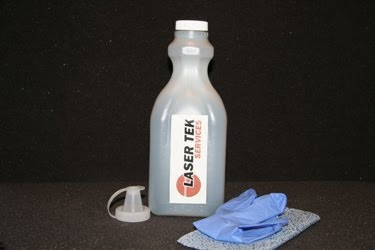
Our Xerox compatible toner refill kits are loaded with gram loads of compatible toner that meet high capacity requirements. Meanwhile, Xerox 7400 and Xerox 2135 kits are supplied with reset chips intended to replace the lockout chips outfitted with respective cartridges. The reset chip will reset the printer’s counter so that printouts can be generated from the refilled cartridge. Note that individual Xerox toner refill kits come with a bottle of high yield, compatible toner powder; 1 funnel cap, a pair of latex gloves, toner wipes and an illustrated instruction manual.
LTS offers competitive pricing with individual kits retailing at $74.95 (Xerox 6360); $56.95 and $64.50 (Xerox 2135 monochrome and color toner respectively); $70.95 and $80.95 (Xerox 7400 monochrome and color toner respectively); and $47.95 (Xerox 7700). Rainbow packs are also available.
For more details and Xerox toner refill kit orders, please visit the LTS website or call our toll free hotline number 877.945.2737.
LTS offers competitive pricing with individual kits retailing at $74.95 (Xerox 6360); $56.95 and $64.50 (Xerox 2135 monochrome and color toner respectively); $70.95 and $80.95 (Xerox 7400 monochrome and color toner respectively); and $47.95 (Xerox 7700). Rainbow packs are also available.
For more details and Xerox toner refill kit orders, please visit the LTS website or call our toll free hotline number 877.945.2737.
February 3, 2010
Dissecting the Cost and Material Components of the HP CP1215 Toner Cartridge
February 3, 2010
0
Toner cartridges, particularly for color laser printers such as the HP CP1215, are expensive. Thus, many users nowadays resort to toner refilling once these cartridges run out of toner supply. Refilling is the most sensible option, considering the cost ratio of toner to the entire cartridge unit which happens to be only 10% or even less than that. Toner supplied with a compatible HP CP1215 toner refill kit is retailed at $33.95 (package includes the reset chip) compared to the OEM cartridge which comes with a price tag of $80. So in a nutshell, the bulk of the amount paid by the user for a new OEM cartridge goes to the material and production cost of the polymer casing that is about $70 in the case of the HP CP1215 OEM cartridge. The user actually saves a lot of money if a cartridge can be refilled several more times over the recommended 3 to 4 refills.
What imaging components are found inside the HP CP1215 toner cartridge? The color cartridge comprises of the toner hopper and waste chamber duo, secured into place by end caps. Releasing the 2 vital components exposes the OPC drum, together with the wiper blade responsible for cleaning the drum's surface of residual toner after each print cycle. The recovery blade completes the work of the wiper blade by channeling excess toner into the waste toner chamber. The second component is the Primary Charge Roller (PCR) that supplies the OPC Drum with a uniform negative DC voltage - a PCR function controlled by the laser printer's intensity setting. Together with the doctor blade, PCR dictates the amount of charged toner that will adhere to the developer roller; aided in the process by the foam feed roller.
Any of the 3 rollers (OPC Drum, PCR and Developer Roller) would become the main cause of print defects if left to perform its routine functions indefinitely. Therefore, when pronounced print defects emanated from these vital components, the faulty component must be immediately replaced to sustain expected print quality. Nevertheless, attempt to analyze the cause of the print defect since print irregularities may also be triggered by a defective OPC Drum wiper blade or a dirty foam feed roller that are designed only as accessory to the main rollers, but can obviously cause backgrounding even then.
The OPC Drum has a rated capacity of over 30,000 printed pages at 5% coverage, so never suspect the integrity of the OPC, particularly when the capacity is not yet breached. Besides, an OPC drum has a microchip page counter that turns off the printer automatically once the rated capacity has been reached. In most instances, the PCR and developer roller are the first components to yield to the wear and tear of everyday laser printing, and following subsequent refills using HP toner refill kits. Therefore, the mentioned components need to be replaced as soon as possible to keep the toner cartridge in tip top condition.
So, when print defects persist and the OPC Drum is still in fine form, the user is left with no option but to replace the PCR and Developer Roller.
What imaging components are found inside the HP CP1215 toner cartridge? The color cartridge comprises of the toner hopper and waste chamber duo, secured into place by end caps. Releasing the 2 vital components exposes the OPC drum, together with the wiper blade responsible for cleaning the drum's surface of residual toner after each print cycle. The recovery blade completes the work of the wiper blade by channeling excess toner into the waste toner chamber. The second component is the Primary Charge Roller (PCR) that supplies the OPC Drum with a uniform negative DC voltage - a PCR function controlled by the laser printer's intensity setting. Together with the doctor blade, PCR dictates the amount of charged toner that will adhere to the developer roller; aided in the process by the foam feed roller.
Any of the 3 rollers (OPC Drum, PCR and Developer Roller) would become the main cause of print defects if left to perform its routine functions indefinitely. Therefore, when pronounced print defects emanated from these vital components, the faulty component must be immediately replaced to sustain expected print quality. Nevertheless, attempt to analyze the cause of the print defect since print irregularities may also be triggered by a defective OPC Drum wiper blade or a dirty foam feed roller that are designed only as accessory to the main rollers, but can obviously cause backgrounding even then.
The OPC Drum has a rated capacity of over 30,000 printed pages at 5% coverage, so never suspect the integrity of the OPC, particularly when the capacity is not yet breached. Besides, an OPC drum has a microchip page counter that turns off the printer automatically once the rated capacity has been reached. In most instances, the PCR and developer roller are the first components to yield to the wear and tear of everyday laser printing, and following subsequent refills using HP toner refill kits. Therefore, the mentioned components need to be replaced as soon as possible to keep the toner cartridge in tip top condition.
So, when print defects persist and the OPC Drum is still in fine form, the user is left with no option but to replace the PCR and Developer Roller.
February 1, 2010
Repetitive Defect Chart: Dependable Guide to Troubleshooting Print Quality Defects
February 1, 2010
0
Print quality defects hardly manifest in the operation of brand new HP LaserJet CP1215 laser printer units. Over time, print defects could no longer be avoided as the printer ages. The reason for this is obvious. As printer components start to wear out on the aging printer, this directly manifests over the output pages. The print engine of the laser printer works mechanically to deliver paper from one component to the next; aided in the process by sensitive sensors which inform the user in the event that one vital part malfunctions and shut-off the printer unit altogether. This is an automatic response system because operating with a damaged component would affect the condition of all the other components and consequently increase printer repair and maintenance costs in the process.
However, the user can easily monitor the condition of pertinent printer components through the print defect that manifest over the printout and institute troubleshooting by simply studying the physical properties (i.e. the defect's ruler measurement) of the defect and identifying the suspect component through the printer's Repetitive Defect Chart thereafter. Any print defect is typically triggered by a damaged printer component; but identifying the source component for the defect without the aid of the Repetitive Defect Chart can be difficult and time consuming. For example, if the Image Transfer Belt (ITB) is damaged, the ensuing print defect manifests at intervals of more than a full page. Thus, replacing the ITB at this point makes more sense in the intent of restoring acceptable print quality. The same also holds true for defects that cover a distance of 75.8 mm over the face of the paper as this print anomaly points out to a defective Organic Photo Conductive (OPC) Drum. In this case, the component has to be cleaned and thoroughly assessed or replaced.
Below is a rundown of different laser printer components and the corresponding print defect that legibly shows on the printout which directly affects the integrity of prints.
· Defective ITB the distance is 633.6 mm and is longer than one full page.
· OPC Drum – 75.8mm
· Transfer Rollers – 57.0 mm
· Fuser Pressure Roller – 56.8 mm
· Fuser Sleeve – 56.5 mm
· Registration Roller – 44.0 mm
· RS Roller (feed roller) – 28.5 mm
· PCR (Primary Charge Roller) – 26.7 mm
· Developer Roller Sleeve – 22.3 mm
The Repetitive Defect Chart clearly identifies problem components that consequently eases out the troubleshooting process to free the laser printer from nagging print defects. It is for a fact that for brand new laser printer units, the only defect that could materialize is one coming from a low toner supply. This can be easily resolved through the purchase of a brand new toner cartridge to replace the exhausted unit. A more cost-effective option is the refill of used toner cartridges with compatible toner supplied with the HP CP1215 toner refill kit which generates big savings in the process.
The monochrome toner cartridge costs $80, while the corresponding refill package retails for only $33.95. Both toner products deliver similar print quality and yields 2200 at 5% page coverage. Package also comes with a cartridge reset chip.
However, the user can easily monitor the condition of pertinent printer components through the print defect that manifest over the printout and institute troubleshooting by simply studying the physical properties (i.e. the defect's ruler measurement) of the defect and identifying the suspect component through the printer's Repetitive Defect Chart thereafter. Any print defect is typically triggered by a damaged printer component; but identifying the source component for the defect without the aid of the Repetitive Defect Chart can be difficult and time consuming. For example, if the Image Transfer Belt (ITB) is damaged, the ensuing print defect manifests at intervals of more than a full page. Thus, replacing the ITB at this point makes more sense in the intent of restoring acceptable print quality. The same also holds true for defects that cover a distance of 75.8 mm over the face of the paper as this print anomaly points out to a defective Organic Photo Conductive (OPC) Drum. In this case, the component has to be cleaned and thoroughly assessed or replaced.
Below is a rundown of different laser printer components and the corresponding print defect that legibly shows on the printout which directly affects the integrity of prints.
· Defective ITB the distance is 633.6 mm and is longer than one full page.
· OPC Drum – 75.8mm
· Transfer Rollers – 57.0 mm
· Fuser Pressure Roller – 56.8 mm
· Fuser Sleeve – 56.5 mm
· Registration Roller – 44.0 mm
· RS Roller (feed roller) – 28.5 mm
· PCR (Primary Charge Roller) – 26.7 mm
· Developer Roller Sleeve – 22.3 mm
The Repetitive Defect Chart clearly identifies problem components that consequently eases out the troubleshooting process to free the laser printer from nagging print defects. It is for a fact that for brand new laser printer units, the only defect that could materialize is one coming from a low toner supply. This can be easily resolved through the purchase of a brand new toner cartridge to replace the exhausted unit. A more cost-effective option is the refill of used toner cartridges with compatible toner supplied with the HP CP1215 toner refill kit which generates big savings in the process.
The monochrome toner cartridge costs $80, while the corresponding refill package retails for only $33.95. Both toner products deliver similar print quality and yields 2200 at 5% page coverage. Package also comes with a cartridge reset chip.
January 26, 2010
The Drum Recovery Blade: Its Function and Contribution to Print Defects
January 26, 2010
0
Streaking and line-associated image defects appearing over printouts are often attributed to an aging printer cartridge drum. The mentioned defects often transpire with high yield toner cartridges that are rated beyond 5,000 pages at 5% page coverage such as the C500H2KG unit that loads the Lexmark C500 series of laser printers. Drum life is designed to last as long as the volume of toner supplied with the cartridge unit; to even outlive the rating of the cartridge with its set life cycle of 30,000 pages. Therefore, when streaking and line image irregularities manifest over printouts even prior to the depletion of toner supply, said defects cannot be entirely blamed on the drum unit. The wear and tear the drum unit endures over large volume printing likely has its impact on a particular drum component called the Drum Recovery Blade that works to clean the drum surface of residual toner after every print cycle.

The Drum Recovery Blade functions like the wiper blade of a car that clears the windshield of rain water or snow during blizzards to improve road visibility. When the wiper's wear out, certain sections of the windshield are not effectively cleaned; to therefore compromise road visibility. The same thing happens to a defective recovery blade. Since the component could no longer effectively clean the drum from residual toner, print defects materialize. The recovery blade inside the cartridge is composed of a thin Mylar (plastic sheet) that is devised to collect excess toner sticking on the drum surface and consequently transfer collected toner into the cartridge's waste chamber. Being thin-skinned, the component easily deteriorates and warps. In this condition, the recovery blade could no longer maintain a tight seal; causing toner to splatter on the paper path.
Consumers are always privy to misconceptions, like the assumption that toner refills (even with the use of compatible toners such as the toner supplied with the Lexmark C500 high yield toner refill kit) can cause toner leaks. Always be guided that toner refills on used toner cartridges will never cause toner leaks. Instead, an old, damaged cartridge recovery blade is behind toner leaks inside the printer on most occasions. Moreover, never assume that OEM toner cartridges are always free from defects. Toner leaks can also transpire with genuine cartridges, particularly when the thin Mylar recovery blade is not properly aligned during installation.
January 6, 2010
Fact: Only About 52% of Laser Printer Users know that Toner Refill Kits Exist!
January 6, 2010
0
This is the sad state of our printing industry since nobody really cares about the plight of empty toner cartridges. Research points out that around 165 million toner cartridges were saved from landfills, but still the bulk of 700 million cartridges end up ditched into dumpsites and landfills worldwide, and the figure is to likely increase by12% annually. With each cartridge weighing around 1.5 kilograms on the average, this translates to e-garbage equivalent to around 825,000 F430 GT3 Ferrari Sports Cars in weight alone. Incessant dumping proliferated because not all laser printer users have been duly informed about the availability of compatibles in the aftermarket or the operation of recycling centers in our country.
Konica Minolta is aware of its social responsibility and thus designed its replacement cartridges to be refill friendly; thereby extending the lifecycle of each cartridge to at least 3 refills. At the end of the serviceable life of each cartridge, Konica Minolta’s ‘Clean Planet’ program entices its customer base to return used toner cartridges for recycling through parcel services, free of charge. Programs such as ‘Clean Planet” will help decongest our dumpsites, landfills and incinerators from tons and tons of e-garbage.
Recycling not only involves the return of empty toner cartridges to printer manufacturers. The use of toner refill kits to refill used or empty toner cartridges is one form of recycling. Refills can be administered over empty Konica Minolta toner cartridges such as the 1710517-005; allowing the user to save in the process. An OEM toner cartridge for the QMS 2300DL laser printer retails at around $120 and yields some 4,500 pages at 5% coverage, while the equivalent Konica Minolta 2300 toner refill kit is sold online for only $22.00. Since both toner products exhibit similar characteristics, expect print quality and yield performance for both OEM and compatible toner to be similar as well. Most likely, the only factor making customers hesitant from using toner refill kits is the perception that the refill process is difficult. Well, browsing the illustrated instructional material would tell you that refilling an empty cartridge is so easy that it can be completed from between 5 to 10 minutes.
Even though only 52% of laser printer users are aware of the presence of toner refill kits as an aftermarket replacement consumable, this figure will surely continue to rise as consumers will begin to appreciate its benefits.
Konica Minolta is aware of its social responsibility and thus designed its replacement cartridges to be refill friendly; thereby extending the lifecycle of each cartridge to at least 3 refills. At the end of the serviceable life of each cartridge, Konica Minolta’s ‘Clean Planet’ program entices its customer base to return used toner cartridges for recycling through parcel services, free of charge. Programs such as ‘Clean Planet” will help decongest our dumpsites, landfills and incinerators from tons and tons of e-garbage.
Recycling not only involves the return of empty toner cartridges to printer manufacturers. The use of toner refill kits to refill used or empty toner cartridges is one form of recycling. Refills can be administered over empty Konica Minolta toner cartridges such as the 1710517-005; allowing the user to save in the process. An OEM toner cartridge for the QMS 2300DL laser printer retails at around $120 and yields some 4,500 pages at 5% coverage, while the equivalent Konica Minolta 2300 toner refill kit is sold online for only $22.00. Since both toner products exhibit similar characteristics, expect print quality and yield performance for both OEM and compatible toner to be similar as well. Most likely, the only factor making customers hesitant from using toner refill kits is the perception that the refill process is difficult. Well, browsing the illustrated instructional material would tell you that refilling an empty cartridge is so easy that it can be completed from between 5 to 10 minutes.
Even though only 52% of laser printer users are aware of the presence of toner refill kits as an aftermarket replacement consumable, this figure will surely continue to rise as consumers will begin to appreciate its benefits.
December 31, 2009
Your Wish Items for the New Year
December 31, 2009
0
Do you have a new year’s wish list? If you are a laser printer user, then a toner refill kit is one item that should form part of the things you’d want to get for the upcoming year. Not that you won’t be able to afford it, but a steady supply of monochrome or color refill kits on hand should give you a year of uninterrupted, quality printing without putting a dent in your pockets.

So now that you’ve registered a toner refill kit for say your Brother HL-4040 laser printer, just where should your family and friends secure this consumable? Well, they can easily purchase it online and have it delivered to your home in time for the New Year’s celebration. Laser Tek Services, Inc. offers a wide array of third party consumables, from compatible toner cartridges, reset chips, OPC drum kits, reset gears and of course toner refill kits.
For the HL-4040 laser printer, the Brother TN-115/TN-110 toner refill kit 4 Pack can be used to refill both the high yield (TN-115) standard yield (TN-110) cartridge at the low price of $154.95. Package includes 4 bottles of compatible black, cyan, magenta and yellow toner. Materials necessary to conduct the refill are likewise supplied such as toner wipes, 4 funnel caps, a pair of latex gloves and an illustrated instructional material. See what’s up for grabs with every purchase of a Brother TN-115/TN-110 toner refill kit.
LTS toner is 100% compatible with your toner cartridge and laser printer. Compatible toner has been engineered to match the particle specifications of the OEM toner. Therefore, expect the TN-115/TN-110 compatible toner to work seamlessly with cartridge and printer components as well as fuse properly with paper, without causing any damage to your equipment. Also get crisp, clear and professional prints as if you are using an OEM toner cartridge to produce those print jobs.
LTS toner produces similar yield at 5% page coverage. Every bottle of toner is supplied with the same gram load as the OEM toner cartridge. This way, refilled cartridges get the same rating with every printing cycle.
LTS offers free shipping. Orders transacted online and exceeding $50 are shipped for free to any location in the United States and Canada. Items are also shipped the next working day so definitely there won’t be any delay in the receipt of your wish item. For any inquiries, aftersales and troubleshooting concerns, you can easily get in touch with LTS representatives during working hours at its toll free number 1-877-945-2737.
December 9, 2009
HP Toolbox - Activate to clean the HP 2600n Color Laser Printer
December 9, 2009
0
Print troubles and print quality irregularities are seldom encountered in the first few months run of a laser printer unit. Over time, toner and paper dust will accumulate over printer components such as the OPC drum, fuser assembly and even the mechanical rollers that come in contact with paper. This consequently affects component performance and produce print quality defects (like toner smears) over printouts. The only option therefore is to clean or perform maintenance work over affected components; which is tedious since that would involve dismantling pertinent printer panels to reach the inner cavities of the laser printer.
Maintenance work must be concentrated on the fuser assembly since the component does not have an automatic toner cleaning system. As the fuser generates a lot of heat, some of the toner particles tend to adhere to the fuser rollers and stick permanently, even if the cylindrical surface is coated with Teflon (a non-stick material usually coating frying pans). Consequently, a sizeable mass of toner particles sticking to the rollers can produce toner smears over printouts. Fuser rollers therefore need to be cleaned periodically to sustain acceptable print quality; unlike OPC drums that come outfitted with a cleaning device called the doctor blade. The doctor blade is made of thin and soft polymers that collect excess toner from the drum's surface and deposits it to the waste toner chamber of the toner cartridge.
Users of the HP 2600n color laser printer are fortunate because the printer unit comes with a built-in cleaning system that can be activated right on the printer's control panel. The cleaning procedure is outlined as follows:
- Turn on the laser printer and be sure that it is set to ready mode.
- Open the HP Toolbox from the printer's control panel
- When the troubleshooting tab appears, click maintenance and follow it up by pushing the cleaning page icon. The printer will then print a document with printed pattern.
- Remove all loaded print media in tray 2 and from the optional tray 3.
- Take out the printed media with pattern and position it face down into the paper tray 2 or the optional paper tray 3.
- Lastly, press clean on the printer panel
The whole sequence should clear the fuser assembly of baked toner and paper dust, and produce smear free printouts.
Print defects are the fare of laser printers and they are numerous. But when print irregularities are due to a low toner supply or an empty OEM toner cartridge, replenish the cartridge's supply with a compatible toner refill kit and extend its print capacity for up to 3 print cycles.
Look up our previous posts on the HP 2600n laser printer.
Subscribe to:
Posts (Atom)


